Masoren - Google Slide Template: Effortless Professional Presentations
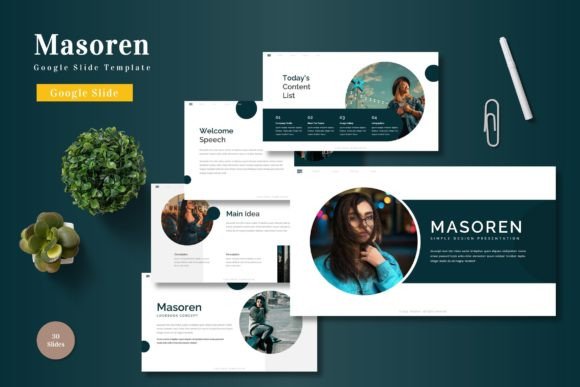
Transforming your ideas into a compelling visual story starts with the right foundation. The Masoren - Google Slide Template provides a versatile and polished framework designed to make your presentations look professionally crafted from the very first slide. It’s more than just a set of layouts; it’s a comprehensive design system built to help you communicate with clarity and style.
This template is a powerful design asset for anyone who needs to create presentations that stand out. Whether you're a business professional pitching to clients, an educator structuring a lecture, or a creative showcasing a portfolio, Masoren offers the structure and aesthetic flexibility to elevate your content. Its clean, modern typography and balanced layouts ensure your message is the hero, supported by a cohesive visual language.
Key Features for Creative Flexibility
What sets this Google Slide template apart is its thoughtful collection of features designed for real-world use. You’re not just getting a static file; you’re getting a customizable toolkit.
- 150+ Total Slides: A vast library of options across five premade color schemes gives you immense variety. With 30 unique slides per template, you can mix and match to build any narrative without repetition.
- Handcrafted Infographics: Data visualization becomes intuitive. These custom-designed infographics help you present complex information in an engaging, easy-to-understand format.
- Pixel-Perfect & Fully Editable: Every graphic element is resizable and editable. The template is based on Master Slides, making global changes simple and ensuring visual consistency throughout your deck.
- Drag & Drop Functionality: Picture placeholders allow you to insert your images effortlessly, saving valuable time during the design process.
Practical Applications for Your Projects
The true value of a well-designed template lies in its application. The Masoren template is suited for a wide range of professional and creative scenarios, helping to establish strong brand identity and visual impact.
For business presentations, its structured slides help articulate strategies, reports, and proposals with professionalism. Marketing teams can use the portfolio and gallery slides to visually demonstrate campaign results or product features. In educational settings, the clear layouts and infographics make complex topics more accessible for students.
Creatives will find it particularly useful for building a digital portfolio or a case study presentation. The clean aesthetic doesn’t compete with your work, allowing your designs, photography, or illustrations to shine. It’s also an excellent resource for creating polished web design mockups, social media graphics guides, or editorial design layouts for digital magazines.
Tips for Choosing and Using Your Template
To get the most out of a premium font and template system like this, consider a few practical tips. First, always preview the slides to ensure the mood aligns with your project’s tone—whether it’s corporate, creative, or minimalist. Test the font pairings suggested or experiment with your own to match your brand identity guidelines.
Take advantage of the color variations. The five included schemes are starting points; use them as inspiration to customize a palette that fits your exact needs. Because the graphics are resizable and editable, you can adapt icons and illustrations to perfectly support your specific content, enhancing visual consistency.
Finally, remember that a great presentation is about storytelling. Use the section break slides to pace your narrative effectively. The right template doesn’t just make things look good; it structures your ideas logically, making your message more persuasive and memorable. Investing in quality design assets like the Masoren - Google Slide Template is an investment in clear, professional communication.